EnvStudio v1.0 Is Here — The Environment Variable Manager You Deserve
2026-04-24
Tags: Windows · EnvStudio · Announcement · Products · Environment Variables
A week ago, we published a deep dive on environment variables — how PATH lookups work, the difference between system and user variables, and everything that makes the built-in Windows editor so painful to use. At the end, we teased that a tool called EnvStudio was on the way.
Today, EnvStudio v1.0 is officially released and available on the Microsoft Store.
What Is It?
EnvStudio is a native Windows environment variable manager built on WinUI 3, delivering an authentic Windows 11 visual experience — Mica transparency material, dark/light theme support, and a fluid NavigationView sidebar. It doesn't replace some niche utility — it replaces that "System Properties → Environment Variables" dialog you've opened a hundred times.
That dialog has barely changed in 20 years. It works, but that's about it. EnvStudio aims higher: making environment variable management something you don't need to brace yourself for.
A Picture Is Worth a Thousand Words
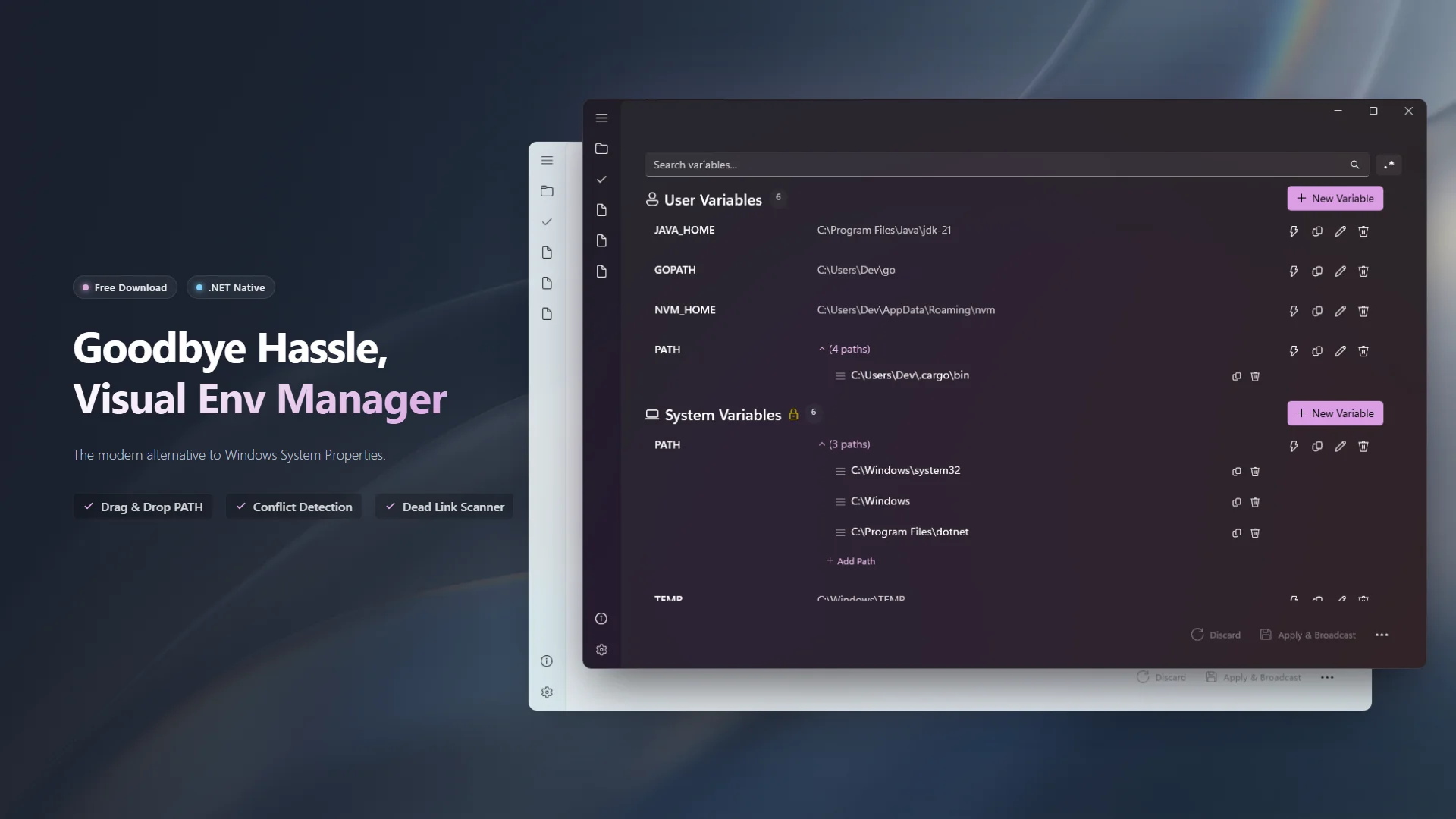
The built-in editor gained per-entry PATH editing after Windows 10, but EnvStudio takes that experience much further:
- Drag-and-Drop Reordering: Grab the handle, drag to reorder. What you see is what you get.
- Deduplication: Same path added two or three times? One click, and it's clean.
- Dead Link Detection: Directories lingering in PATH after uninstalls are automatically highlighted in red — a nudge to clean up.
Beyond Looks — Features You Might Not Expect
A good-looking UI is just the baseline. Where EnvStudio truly shines is in the features that solve real, everyday pain points:
EXE Override Detection
This is the easiest problem to overlook — and the most likely to cause mysterious issues. Suppose your PATH contains two directories that both have python.exe. The system picks whichever comes first. But how do you know which one overrides which? EnvStudio scans all directories in your PATH for executables, finds every overridden program, and lists them all so you can see the conflict at a glance. Click any overridden exe to jump directly to the entry that's shadowing it — no hunting, no guessing.
Scope Conflict Visualization
When you have a user variable and a system variable with the same name (say, a user TEMP and a system TEMP), the system variable gets overridden by the user one. In the built-in editor, this override is completely invisible. You don't know it was overridden. You don't even know it exists.
EnvStudio handles this clearly: overridden system variables display a strikethrough + warning icon. Hover over them to see the full override relationship. You always know which value is actually in effect.
Non-Destructive Toggle
"I just want to temporarily disable a variable to try something, but I don't want to delete it — what if I need it back?" EnvStudio's solution is elegantly simple: disabling a variable silently renames the registry value with a __ES_OFF suffix. The data is still right there. Re-enable it anytime with one click. No screenshots, no manual backups.
Snapshots & Rollback
Before every save, EnvStudio automatically creates a snapshot. If something goes wrong, open snapshot history and you'll see a Git-style diff view — what was added, modified, or deleted, crystal clear. Pick any historical version and roll back with one click.
Profile System
Doing both Java and Node.js development on the same machine? Manually switching JAVA_HOME and PATH every time you switch projects? EnvStudio lets you save your current environment as a named profile (like "Java 8 Project", "Node.js Frontend", "AI/ML Experiments") and switch between them from the sidebar in one click. Your entire environment configuration switches instantly.
Export to Script
Want to share your environment configuration with a teammate, or quickly restore after a system reinstall? Select the variables you want, and export them as a .ps1, .bat, or .env file in one click. Disabled variables are automatically skipped, and select-all support makes it effortless.
Privacy & Security: 100% Offline
EnvStudio does not connect to the internet, does not upload any data, and contains no telemetry or analytics. Your environment variable configuration stays on your machine, period. No data ever leaves your hard drive.
We believe that for a tool that manages your system configuration, trust is the number one priority.
Free to Use, Optional Pro Upgrade
EnvStudio is free to download and use — the free tier supports up to 2 saved profiles and retains the 5 most recent snapshots. An optional one-time Pro upgrade unlocks unlimited profiles and the full snapshot history. No subscriptions, no recurring fees.
If you find it useful, leaving a positive review on the Microsoft Store is the best way to support us.
We Need Your Feedback
EnvStudio just shipped v1.0, and there's plenty of room to improve. Whether you've found a bug or have a feature idea, please let us know on GitHub Issues.
- 🐛 Report a Bug: Something not working right?
- ✨ Suggest a Feature: What would make it better?
From a dialog stuck in the Windows XP era to drag-and-drop reordering, one-click dedup, and snapshot rollback — EnvStudio v1.0 is just the beginning.
Download EnvStudio from the Microsoft Store
You deserve a better environment variable manager.