QuickGUID v1.0 Is Here — The Native Windows GUID Generator & Converter You've Been Waiting For
2026-05-24
Tags: Windows · GUID · QuickGUID · Announcement · Products
Every developer needs GUIDs — for database keys, COM interfaces, message IDs, test data, and more. You've probably been generating them with guidgen.exe, a browser tab, or a one-liner in the terminal, then manually reformatting them for your code. It works, but it's not a great experience.
Today we're releasing QuickGUID, a native Windows app that combines GUID generation, format conversion, and smart text extraction into one seamless experience. It's available now on the Microsoft Store.
A Picture Is Worth a Thousand Words
What Does It Do?
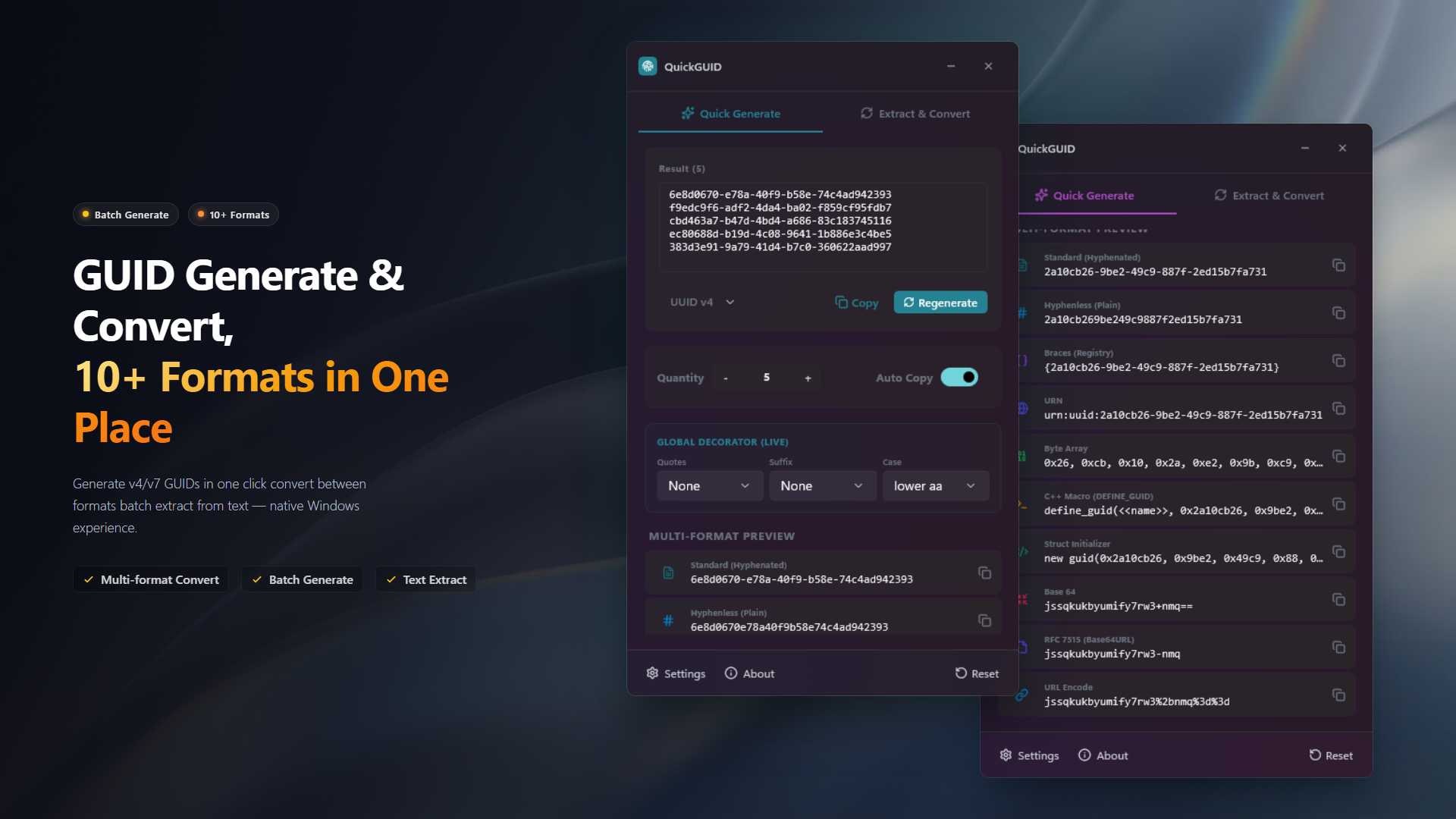
QuickGUID gives you everything you need when working with GUIDs, in one compact window:
Batch Generation
Generate UUID v4 (random) or v7 (time-ordered) GUIDs — up to 1,000 at once. Copy all results with a single click and paste them wherever you need.
10+ Format Conversion
Standard, hyphenless, braced, URN, Base64, Base64URL, C byte array, C++ DEFINE_GUID macro, struct initializer, URL-encoded — every format you'll ever need, all previewed in real time.
Smart Extraction
Paste logs, source code, JSON, or any text — QuickGUID automatically identifies and extracts all GUIDs. Batch-convert extracted GUIDs to your target format in one click. No more squinting through wall-of-text logs.
Live Decorator
Globally control output style — quotes (none, single, double), suffix (none, comma, semicolon), case (lower/upper) — applied in real time across all formats. Perfect for copying GUIDs directly into your code without post-editing.
Why Another GUID Tool?
There's no shortage of GUID generators out there — guidgen.exe ships with Visual Studio, most databases have NEWID() or equivalent, and there are countless web-based tools. But none of them cover the full workflow: generate, convert, extract, format — all in one place.
QuickGUID fills that gap. Need to generate 50 GUIDs for a bulk insert? Done. Need to convert a GUID from a log file into a C struct initializer? Paste, extract, click. Need them all wrapped in double quotes with a trailing comma? Toggle the decorator.
Native Windows Experience
Built with WinUI 3, QuickGUID feels right at home on Windows 11. It respects your system's light and dark theme, uses native controls throughout, and starts instantly — no Electron, no browser, no web server.
Privacy & Security: 100% Offline
QuickGUID does not connect to the internet, does not upload any data, and contains no telemetry or analytics. Your GUIDs and any text you paste for extraction never leave your machine.
Completely Free
All features are completely free — no ads, no paywalls, no premium tiers. If you find it useful, a positive review on the Microsoft Store is the best way to support us.
We Need Your Feedback
QuickGUID is a new release, and we're actively improving it. If you find a bug or have an idea for a new feature, let us know on GitHub.
Sometimes the best tools are the ones that eliminate friction you didn't even notice. QuickGUID won't change how you think about GUIDs — but it might save you a few seconds, a hundred times a day.